Quick Start
Build the Recall CLI from this workspace and run a local development instance.
Prerequisites
- Docker — Docker Engine 24+ with Docker Compose v2
- Node.js — 24.x (for the CLI)
- pnpm — 11.x
- At least one AI provider API key (OpenAI or Anthropic)
Build the CLI
pnpm install
pnpm --filter @dorecall/cli build
pnpm --filter @dorecall/cli exec recall --help
The branded CLI and container images are not yet published to public
registries. For a production pilot, use the deployment runbook included in the
workspace; use the CLI's --dev mode for a local source build.
Initialize Your Instance
Run the interactive setup wizard:
pnpm --filter @dorecall/cli exec recall init --devThe wizard walks you through:
- Config directory — Where to store your
recall.yamland.envfiles (default:./recall) - PostgreSQL — Run Postgres in Docker (recommended) or provide an existing
DATABASE_URL - AI Providers — Configure scrapers (BrightData, Oxylabs, Olostep, DataForSEO) and/or direct model APIs (OpenAI, Anthropic, Mistral, OpenRouter); see Providers for details
- Start — Optionally start the stack immediately
Once complete, Recall generates two files in your config directory:
| File | Purpose |
|---|---|
recall.yaml | Docker Compose configuration for all services |
.env | Environment variables, secrets, and API keys |
Start Recall
If you didn't start during init, bring everything up with:
pnpm --filter @dorecall/cli exec recall compose up -dThis builds the local images and starts all services. Once they report healthy, open http://localhost:1515 in your browser.
System Architecture
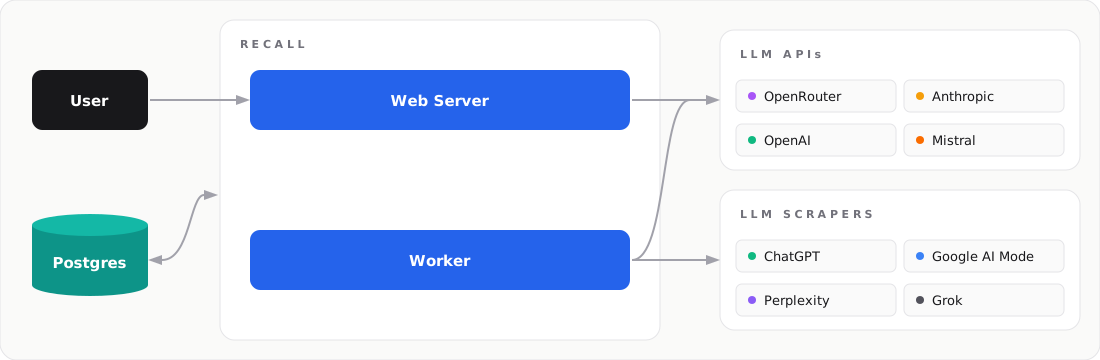
| Service | Role |
|---|---|
| Web | Dashboard UI and REST API |
| Worker | Background scheduler that drives prompt runs |
| Postgres | Shared database and job queue |
| LLM APIs | Direct API calls (OpenAI, Anthropic, OpenRouter) |
| LLM Scraper | Scrapers for ChatGPT, Claude, and Google AI Mode (BrightData, Oxylabs, Olostep) |
| Recall CLI | Generates recall.yaml + .env and runs docker compose |
CLI Commands Reference
Once Recall is running, these commands help you manage it:
# View live logs
recall compose logs -f

# View logs for a specific service
recall compose logs -f web

# Check service status
recall compose ps

# Stop all services
recall compose down
What's Next
With Recall running, head to the User Guide to create your first brand, configure prompts, and start tracking AI visibility.
Was this page helpful?